


(as of Dec 07, 2025 12:54:52 UTC – Details)
< Blender 5: Precise Modeling for Architecture, Engineering, and 3D Printing
SPECIAL FEATURE: Over 300 full-color pages with detailed illustrations, technical schematics, and step-by-step visual guides!
Complete Guide to CAD-Like Precision Modeling in Blender – From Basic Setup to Professional Technical Projects
Blender 5: Precise Modeling for Architecture, Engineering, and 3D Printing transforms Blender into a powerful precision modeling tool for AEC professionals and technical designers. Learn to create architecturally accurate models with numeric precision, CAD-like workflows, and professional-grade techniques.
Compatible with Blender 5.0 and all future 5.x releases, this guide works seamlessly whether you’re using Blender 5.0, 5.1, or beyond. The precision modeling techniques and workflows remain consistent across the entire Blender 5 series.
What You’ll Learn Chapter-by-Chapter:Chapter 1: Blender for Architecture, Engineering, and 3D Printing – Master Blender’s interface for technical work, set up essential add-ons for precision modeling, and organize projects with professional workflows.Chapter 2: Precision Modeling and Numeric Input – Configure metric and imperial units, control transformations with numeric precision, master snap tools including Snap Base, and use measurement tools for accurate modeling.Chapter 3: CAD-like Modeling Tools – Unlock Precision Drawing Tools (PDT) for CAD-style operations including coordinate-based modeling, filleting, chamfering, trim/extend operations, and precise transformations.Chapter 4: Modeling a Floor Plan – Create architectural floor plans from scratch, model walls with precision extrudes, use PDT for wall management, import and clean CAD files (DWG/DXF), and edit drawings with professional techniques.Chapter 5: From 2D to 3D in Architectural Modeling – Transform floor plans into complete 3D models, create door and window frames, add balconies with Geometry Nodes, build barrel arches with booleans, and use the Mirror modifier for symmetrical designs.Chapter 6: Mechanical Modeling – Design precise mechanical parts with technical schematics, manage isometric views with Stored Views, create symmetrical components with Mirror modifier, model geared cylinders, and apply professional finishing techniques with bevels.Chapter 7: Curves and 3D Modeling Tools – Use reference images for accurate modeling, create reusable component libraries with Asset Browser, master curve-based modeling techniques, import SVG files, and create profile-based models.Chapter 8: Modeling for 3D Printing – Prepare models for 3D printing with proper export settings, add multi-color support, use the 3D-Print Toolbox for quality checks, validate geometry for printing, and apply modifiers for printable results.Perfect for Technical Professionals:Architects transitioning from AutoCAD, Revit, or ArchiCAD to BlenderEngineers requiring CAD-like precision in open-source software3D printing enthusiasts creating technical, dimensionally-accurate modelsTechnical designers seeking professional precision modeling workflowsCAD professionals exploring Blender as a viable alternativeAnyone needing to specify exact measurements, angles, and dimensions
Every chapter features real-world technical projects with detailed schematics and measurement-driven workflows. Learn to work with actual dimensions, import CAD files, and produce professional-grade technical models with full numeric control.
Discover how Blender’s combination of precision tools, PDT add-on capabilities, and CAD file compatibility makes it a powerful alternative for technical modeling work—all within an open-source, customizable framework.
From the Publisher
Blender 5 for Precise Modeling
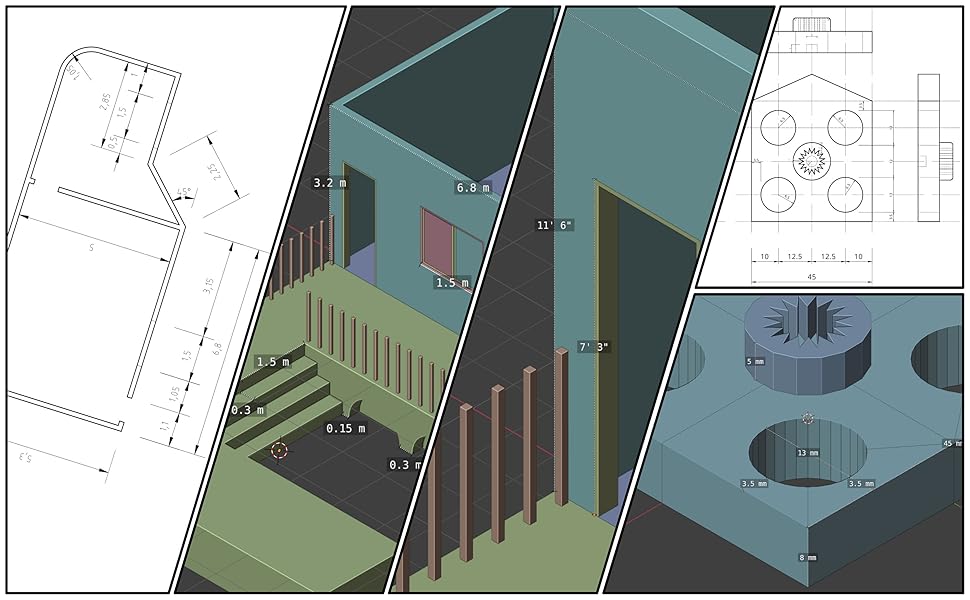
Key Resources and Tools for Precise Modeling
Learn how to use Blender 5 to work with projects requiring precise control over lengths and distances. The book follows several example projects in architecture, engineering, design, and 3D Printing.
Some of the highlights include:
Manage units using both metric and imperial systemsUse the new and powerful Blender 5 Snap systemEnable and use hidden tools from Blender to facilitate precise modelingEmulate CAD tools with Geometry Nodes and ModifiersImport and manage DXF and SVG filesFix and prepare models for 3D Printing
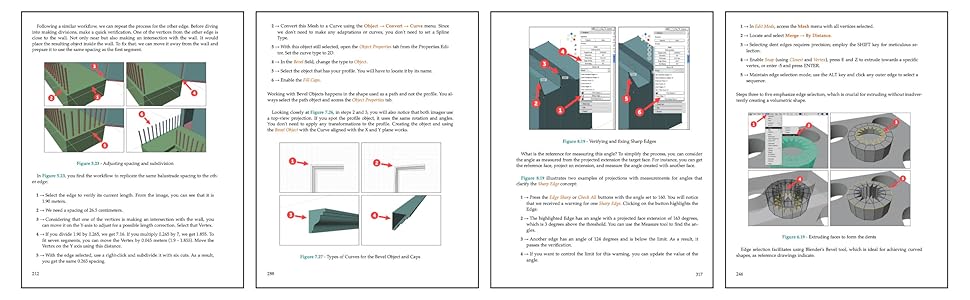
Paperback printed in Color
Sample pages from the book. The paperback is printed in color to ensure maximum legibility.
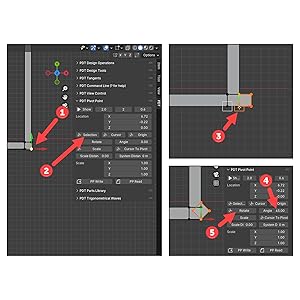
Highlights
Blender 5 for Beginners
The book considers that you don’t have any previous experiences with Blender. You can use it as a starting point to learn Blender 5.
Step-by-Step Guides
Explore Blender 5’s operations and resources with our structured, step-by-step guidance and explanations. Each phase of the sequence receives attention, complete with references and comments that illuminate every action, facilitating your learning journey.
Access Downloadable Assets and Projects
Download all of the projects used in the book to follow the guides and try the designs yourself.
Table of contents Chapter 1 – Blender for Architecture, Engineering, and 3D Printing Chapter 2 – Precision Modeling and Numeric Input Chapter 3 – CAD-like Modeling Tools Chapter 4 – Modeling a Floor Plan Chapter 5 – From 2D to 3D in Architectural Modeling Chapter 6 – Mechanical Modeling Chapter 7 – Curves and 3D Modeling Tools Chapter 8 – Modeling for 3D Printing
ASIN : B0FZKQZWLB
Publisher : Independently published
Publication date : November 4, 2025
Language : English
Print length : 331 pages
ISBN-13 : 979-8272840356
Item Weight : 1.58 pounds
Dimensions : 7.5 x 0.75 x 9.25 inches
Best Sellers Rank: #334,941 in Books (See Top 100 in Books) #26 in 3D Graphic Design #55 in 3D Printing Books #68 in Industrial Manufacturing


